Delete PDF Pages Tool: Remove Unwanted Pages from PDF Files Effortlessly
PDF files are widely used for sharing documents, reports, eBooks, and presentations. However, PDFs often contain unnecessary pages that increase file size and make navigation difficult. If you want to keep your PDFs clean and organized, the Delete PDF Pages Tool is the ideal solution.
This online tool allows users to quickly remove unwanted pages from PDF files without compromising quality. Whether you’re a student, professional, or writer, this tool is designed to save time and improve document management.
What is a Delete PDF Pages Tool?
A Delete PDF Pages Tool is an online utility that helps users remove specific pages from PDF documents. Unlike traditional PDF editors, it is simple, fast, and accessible online, making it perfect for anyone working with PDFs.
Key advantages include:
No installation required – Works in any browser.
User-friendly interface – Easy for beginners.
High-quality output – Maintains original text and images.
Bulk page deletion – Remove multiple pages at once.
Benefits of Using a Delete PDF Pages Tool
Using this tool offers multiple advantages for both personal and professional use:
1. Reduce PDF File Size
Unnecessary pages increase PDF size. Removing them reduces the file size, making it easier to share via email or upload online.
2. Organized Documents
Deleting unwanted pages keeps your files clean, professional, and easy to read. Ideal for reports, presentations, and eBooks.
3. Save Time
Instead of manually editing PDFs or recreating files, you can delete pages in seconds.
4. Improved Readability
With clutter removed, readers can navigate your PDF more efficiently.
5. Secure and Private
Files are processed online without storing personal information, ensuring complete privacy.
How to Use the Delete PDF Pages Tool
Using the tool is simple:
Step 1: Upload PDF
Go to the Delete PDF Pages Tool page and upload your PDF file.
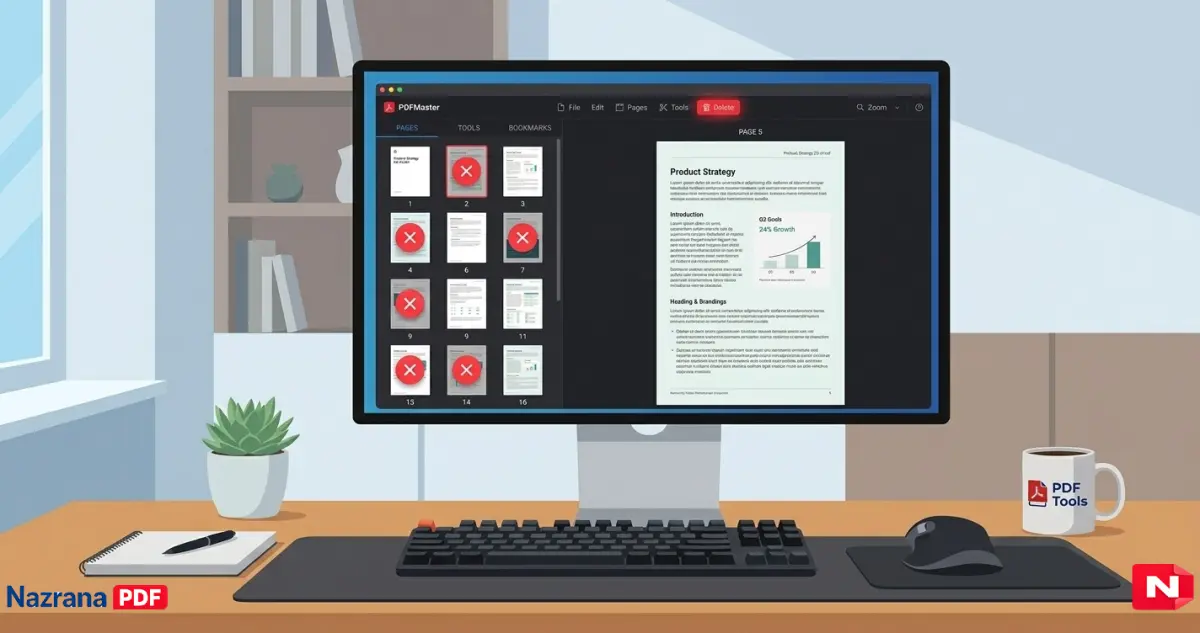
Step 2: Select Pages
Select individual pages or ranges of pages you want to remove.
Step 3: Preview
Check the pages you selected to ensure you are deleting the correct ones.
Step 4: Delete Pages
Click the “Delete Pages” button to remove unwanted pages.
Step 5: Download PDF
Download your updated PDF with unwanted pages removed. Your file is now smaller, cleaner, and easier to share.
Who Can Benefit from This Tool?
Students: Clean up lecture notes, assignments, or eBooks.
Professionals: Remove unnecessary pages from reports, presentations, and proposals.
Writers & Publishers: Edit manuscripts or PDF publications before sharing.
Everyone: Organize PDFs for personal or work use efficiently.
Why Choose Online Delete PDF Pages Tool?
Traditional PDF editors can be slow, expensive, or complex. This online tool offers:
Instant access from any device
Free or affordable usage
Simple drag-and-drop interface
No software installation needed
Safe, secure, and fast processing
SEO Tips for PDFs and This Tool
Use Descriptive File Names: Example: Project_Report_2026.pdf.
Keep PDFs Lightweight: Removing unnecessary pages improves sharing speed.
Maintain Quality: Ensure text and images remain high quality for credibility.
Internal Linking: Link PDF tools to related blog posts like “Merge PDF Tool,” “Compress PDF Tool,” or “Convert Word to PDF Tool” to boost SEO.
Conclusion
The Delete PDF Pages Tool is a must-have for anyone managing PDF files. It is fast, secure, user-friendly, and helps improve PDF organization, readability, and file size.
Whether you are a student, professional, or writer, this tool ensures your PDFs are always clean and ready to share.
Start using the tool now: Delete PDF Pages Tool
Frequently Asked Questions About Delete PDF Pages Tool
Q1: Can I delete multiple PDF pages at once?
A: Yes! The Delete PDF Pages Tool allows you to select and remove multiple pages in a single operation, saving time and effort.
Q2: Will deleting pages reduce the PDF quality?
A: No. The tool ensures that remaining pages maintain their original quality, including images and text formatting.
Q3: Do I need to install software to use this tool?
A: No. It is a web-based tool that works directly in your browser on any device—Windows, Mac, or mobile.
Q4: Is my PDF file secure while using this tool?
A: Absolutely. Files are processed online without storing personal information, ensuring complete privacy and security.
Q5: Can I undo deleted pages?
A: The tool automatically creates a backup before deletion, so you can recover your file if needed.